 BestDock
Live widgets
Not shortcuts: tiles that update in place. Time left on a timer, the song playing, your next meeting, CPU load, a water goal.
BestDock adds a bar of live widgets to your Mac: clock, weather, music, calendar, system stats, your Claude sessions and about a hundred more. Your windows make room for it, just like they do for the macOS Dock.
14 days free, no account and no card. Requires macOS 14 or later.


Real captures. Scroll sideways on small screens.
Most widget bars float on top of your work and cover whatever is underneath. BestDock reserves its strip of the screen the way the native Dock does: maximized, tiled and newly opened windows stop above it instead of sliding behind it.
Pick how much breathing room you want, keep it after you drag a window, or fade the bar when a window passes over it. It needs the Accessibility permission to move windows, and nothing else.
Not shortcuts: tiles that update in place. Time left on a timer, the song playing, your next meeting, CPU load, a water goal.
Drag the grip at the end of the dock like the macOS Dock separator, or use ⌘ + scroll, pinch, or Settings. From 60% to 160%.
Up to 8 profiles, each with its own widgets and settings. Switch with ⌃⌥⌘1…8, the dots on the dock, or a two-finger swipe.
Replace the Dock, sit above it, reveal on hover at the bottom or the top, pin it in six positions, or float it anywhere you like.
Show it on one screen (main, under the pointer or a chosen one) or on all of them, with its position remembered per display.
Keep everything in a single row that scrolls with the trackpad or mouse wheel, or let the widgets adapt to the space you have.
Add what you need from a searchable gallery, reorder by dragging, and show some only when they matter: music playing, high CPU, low battery, a meeting about to start.
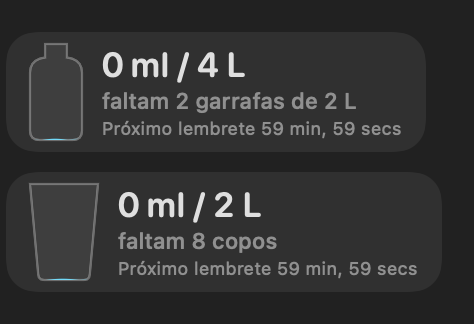
A water goal with reminders, a pomodoro timer, and a Claude sessions counter that tells you when a long run has finished. Each one updates in place, so you never open an app just to check.
BestDock runs on your Mac and keeps its settings in a file you can read. It does not phone home.
The app sends no usage data. This website uses no trackers and no cookies.
Credentials for integrations are stored in the macOS Keychain, never in the config file.
Accessibility, Calendar, Music and the rest are requested only when a feature needs them.
Your license key is verified on your Mac. No activation server, no account, no sign-in.
Try it for 14 days first. No key needed.
Secure checkout by Stripe. Your key is shown right after payment and emailed to you.
A Mac running macOS 14 (Sonoma) or later. Liquid Glass styling is used on macOS 26 and later; earlier versions get a clear or dark glass look.
Only to move other apps' windows out of the dock strip (the "reserve space" feature) and for the window manager widget. macOS requires this permission for any app that repositions windows. BestDock does not read window contents. If you decline, the dock still works and simply floats over windows.
You get 14 days from the first launch with everything unlocked and no key. After that, enter a license key to keep using it.
Yes, on your own Macs for personal use. One purchase covers the Macs you use yourself. It is not for resale or for deploying across a company.
Every version published during the year after you buy is yours. Later versions are optional: the version you have keeps working, and you are never locked out.
Yes. Within 14 days of purchase, write to the support address with the email used at checkout and you get your money back.
Use the recovery page: enter your purchase email and we send the key again.
No. The app has no telemetry. Details are in the privacy policy.